Designing Custom Role Collections in SAP BTP for Secure Access Management
As organizations increasingly build and run applications on SAP Business Technology Platform (SAP BTP), managing user access becomes a critical part of cloud security and governance.
SAP BTP uses role collections to simplify authorization management across applications and services. Instead of assigning multiple roles individually to users, administrators can group roles into role collections and assign them in a single step.
While SAP provides standard role collections for many applications, enterprises often need custom role collections to implement stronger governance, enforce segregation of duties, and follow least-privilege security principles.
Role collections play a central role in SAP BTP access management. They help organizations implement role-based access control (RBAC), simplify user provisioning, and maintain consistent authorization across cloud applications and services.
This authorization model is widely used in enterprise SAP environments to ensure scalable and secure access management.
What Are Role Collections in SAP BTP?
Role collections are logical groups of roles that can be assigned to users or identity provider groups. This approach simplifies access management by allowing administrators to grant multiple permissions through a single assignment.
Most SAP applications come with pre-delivered roles and role collections to help teams get started quickly. For example, in SAP Integration Suite i.e. Cloud Integration (CPI), you will commonly see standard role collections such as:
- PI_Administrator - Provides full administrative access to manage SAP Cloud Integration tenant configuration, security settings, and overall administration.
- PI_Integration_Developer - Allows developers to create, modify, and deploy integration flows and other integration artifacts in SAP Cloud Integration.
- PI_Business_Expert - Enables business users with appropriate permissions to access and monitor business-sensitive integration data.
- PI_Read_Only - Grants read-only access for support users to view integration content and monitoring information without modifying sensitive business data.
These roles provide ready-to-use access for administrators, developers, and operators working in the CPI environment. However, while convenient, standard roles and role collections are often too broad for enterprise environments.
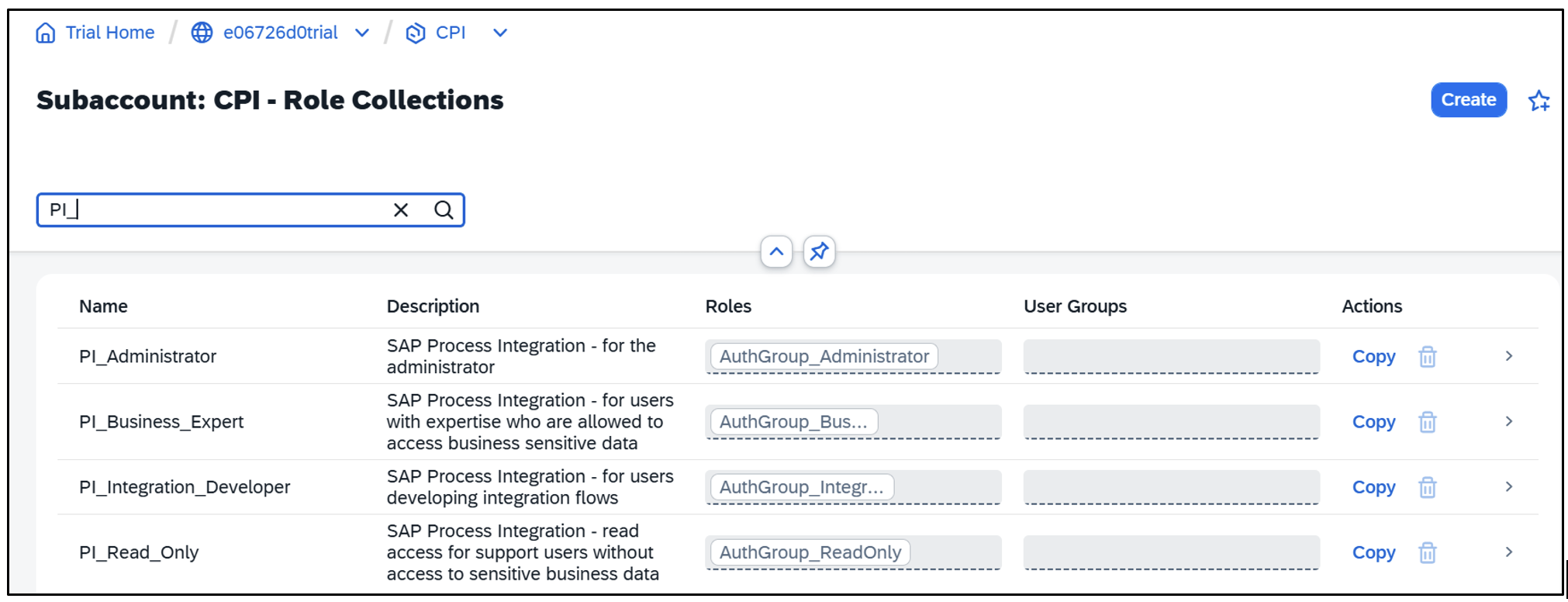 Figure: Managing role collections in the SAP BTP Cockpit
The Need for Custom Role Collections in Enterprise Environments
As organizations scale their cloud landscape, they need a more controlled and structured access model. This is where custom role collections become important.
1. Enforcing Segregation of Duties (SoD)
In many enterprises, the same person should not develop, deploy, and administer an application. Standard roles may combine multiple permissions, but custom role collections allow organizations to separate responsibilities clearly.
This separation strengthens internal controls and improves governance.
2. Applying the Principle of Least Privilege
Security best practices recommend granting users only the permissions they actually need to perform their tasks. Instead of assigning a broad access, organizations can create smaller role collections that provide only the necessary permissions. This reduces security risks and limits the potential impact of misconfigurations.
3. Integration with Enterprise Identity Providers
Most companies integrate BTP with enterprise identity systems such as SAP Cloud Identity Services. Custom role collections can be mapped directly to identity groups, making user provisioning automated and easier to manage.
How to Create Custom Role Collections in SAP BTP
As an example, let’s create a read-only role collection for SAP Integration Suite. In below example, I am combining standard roles into a custom role collection. Creating a custom role collection is straightforward:
1. Navigate to BTP Cockpit ? Security ? Role Collections
2. Click Create
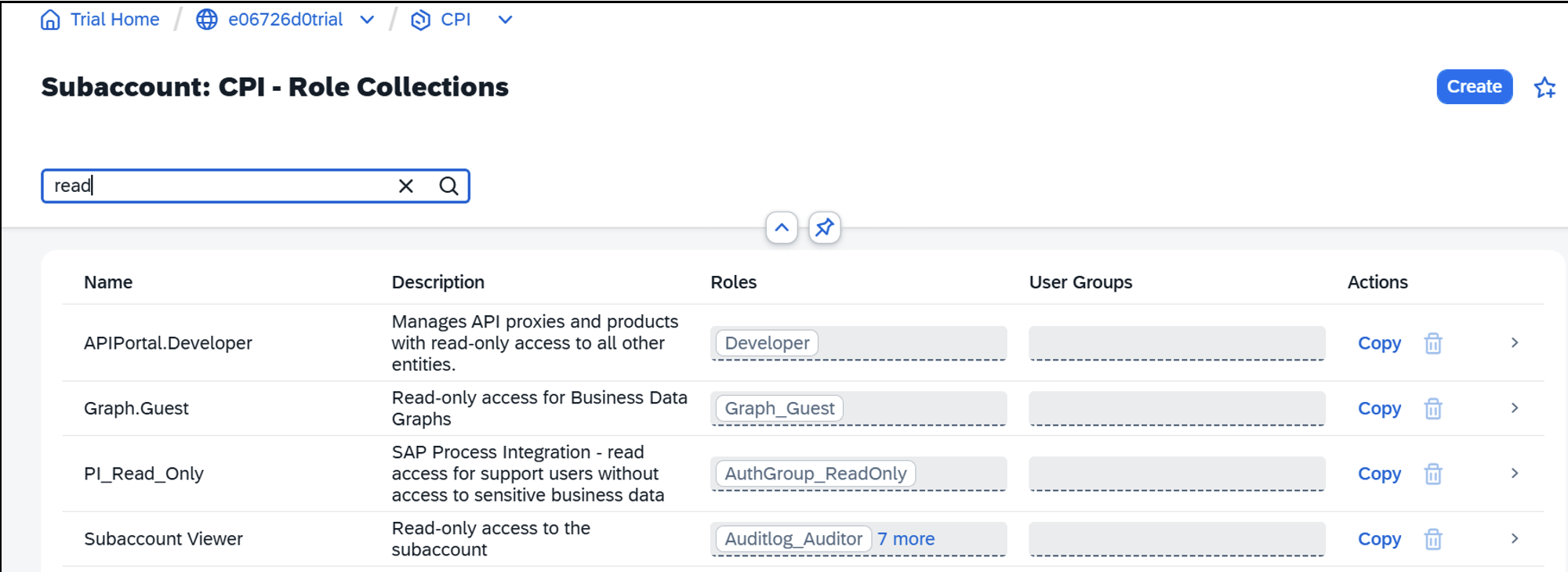 3. Define a name and description
 4. Add the required roles for the application (e.g., CPI roles)
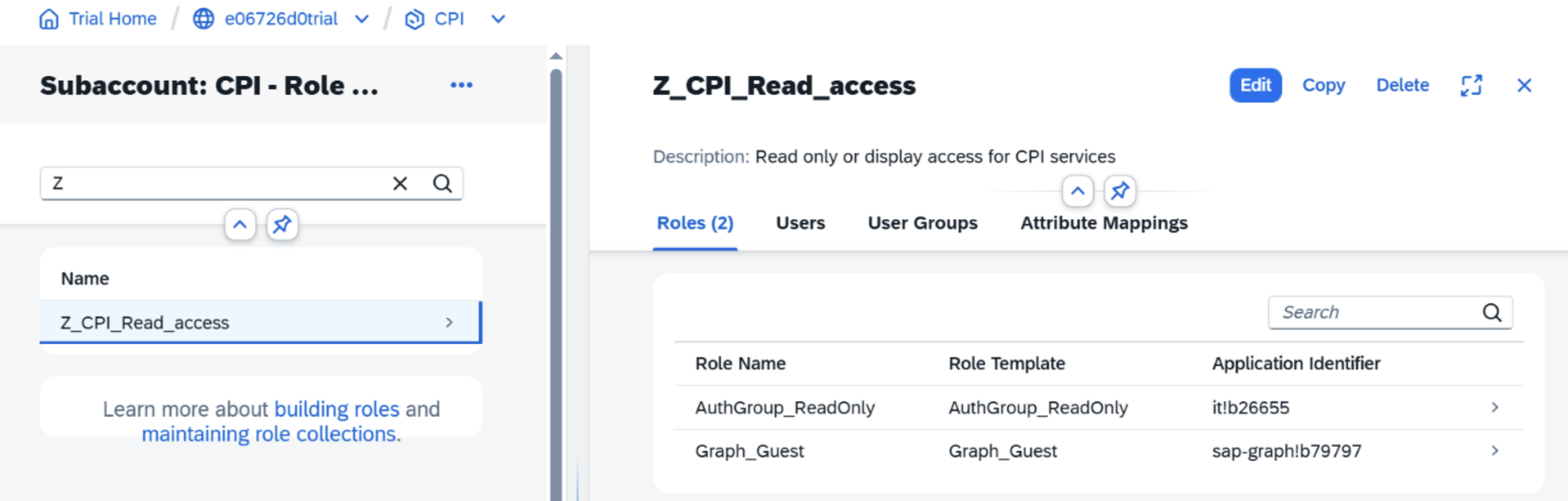
5. Assign the role collection to users or identity provider groups.
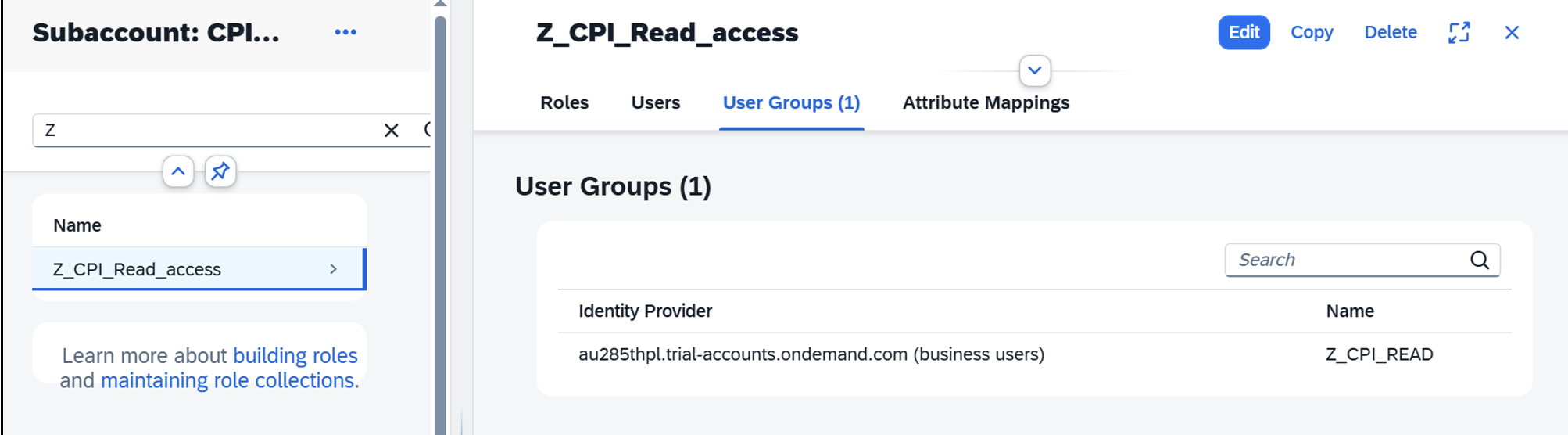
Once assigned, users automatically inherit all permissions included in the role collection.
Best Practices for Role Collection Design
Document Your Strategy
Create clear documentation for each role collection including its purpose, permissions, and intended users.
Perform Regular Reviews
Conduct quarterly reviews to ensure role collections remain aligned with business and security requirements.
Automate Where Possible
Use identity provider integrations to automate user provisioning and de-provisioning.
Enable Audit Logging
Configure audit logging to track role assignments and authorization changes.
Final Thoughts
Standard role collections in SAP BTP are a great starting point, but custom role collections are essential for enterprise-grade access management. They help organizations implement:
- Segregation of Duties
- Least privilege access
- Better governance and audit transparency
- Simplified identity integration
Using SAP Integration Suite (CPI) as an example, we can see how tailored role collections create a clean, secure, and scalable authorization model for cloud applications. Designing thoughtful role collections today ensures that your SAP BTP landscape remains secure, scalable, and compliant as cloud adoption grows.
Expert Insight: Designing Secure Role Collections
In large SAP BTP environments, assigning standard role collections directly to users often results in excessive permissions. Designing smaller, purpose-specific role collections improves governance, reduces security risks, and simplifies audit reviews.
Related SAP Security Topics
- SAP BTP Security Best Practices
- SAP Authorization Concepts in Cloud Environments
- Identity Management in SAP BTP
- SAP BTP Authorization Model Explained